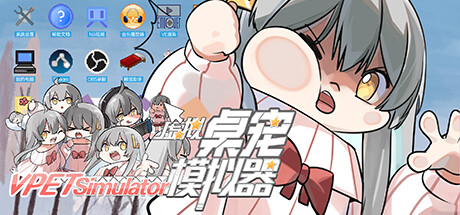
Feeling like the computer desktop is too dull? Need something cute to heal oneself? Come and try this new completely free and open source V-Pet simulator. A cute and adorable pet that supports various feeding interactions to accompany you in game learning is definitely your best choice!
DESCRIPTION SUPPLIED BY THE DEVELOPER THROUGH STEAM
Check the official page for current availability, supported devices and any in-game purchases.
ANSWERS FOR YOUR FIRST SESSION
VPet-Simulator gameplay guide and player questions
Steam edition · Researched Nov 9, 2026 · Guide updated Nov 9, 2026.
Source facts
Is this software a standalone game or part of another program?
This is an independent desktop pet software. While it serves to promote the VUP Simulator, it functions as its own separate application and is not a built-in component of the VUP Simulator tutorial program.
What kind of interactions can I have with my desktop pet?
You can engage in various interactive animations with your pet. Examples include touching its head or body, watching it dance, or seeing it climb the walls of your desktop environment. There are over 200 types of animations available.
Yes, the software supports the Steam Workshop, allowing you to add or modify table pet animations, food, beverages, speech text, and themes. You can even add new features like alarm clocks or dashboards through code plugins.
Is it possible to create my own content for the pet?
Absolutely. You can create your own animations or interactions with other characters and upload them to the Steam Workshop to share with the community. Most content can be added without needing to modify the underlying source code.
The software is completely free to use. It is also open source, meaning the project is available on GitHub where users are encouraged to contribute ideas or participate in the ongoing development of the project.
Can I modify the source code to change how the pet works?
Yes, the project is open source on GitHub. You are welcome to modify the code to create your own unique table pet, although most content customization can be handled easily through the Steam Workshop without code changes.
Yes, the software includes Steam Leaderboards and Steam Achievements. These features allow you to track your stats and compete or compare your progress with other users within the community through the integrated Steam platform services.
How can I provide feedback or suggest new features?
If you have suggestions, comments, or encounter issues, you can contact the developer through the Steam store comments or community forums. Alternatively, you can submit a GitHub Issue or reach out via email for direct communication.
Does the software support multiplayer or co-op modes?
Yes, the software features support for single-player, multi-player, and online co-op modes. These options allow for interactive experiences beyond just a solo desktop pet session, utilizing the platform's connectivity features.
Can I add new logic or display schemes like Live2D?
Yes, you can add new animation logic or display schemes, such as Live2D or spin animations, by writing code plugins. This allows for advanced customization of how your pet appears and behaves on your desktop.
AI-assisted research with automated evidence and consistency checks. Good Game Daily organizes publisher information into practical answers. Guidance is an editorial interpretation of those sources. These notes are based on source research rather than a firsthand playtest; editions and later updates may differ.
YOUR NEXT STEP
Plan how your group will connect
For VPet-Simulator · Steam edition.
This Steam edition lists Co-op, Online Co-op. Choose the mode that matches your group’s computers, network or shared display.
Before inviting friends, confirm the player limit, copy or account requirements and exact compatible editions. A listing on another platform does not establish cross-play.
The base game is listed as free to play; extras may cost more.