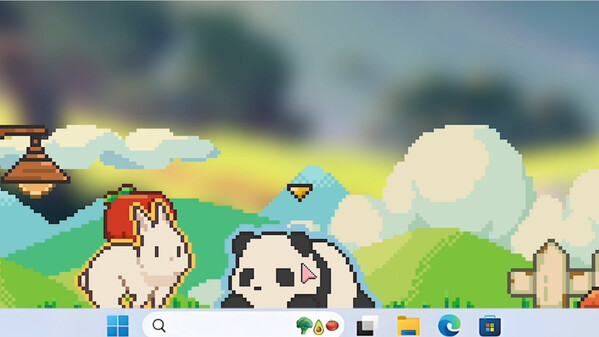
Meet your new little desk buddies! They’ll snooze, scratch, and scamper around while you work or study (don’t worry, they’ve been trained not to invade your workspace). If you’re good at animal management, they will occupy the bottom of your screen with different kinds and colors!
DESCRIPTION SUPPLIED BY THE DEVELOPER THROUGH STEAM
Check the official page for current availability, supported devices and any in-game purchases.
ANSWERS FOR YOUR FIRST SESSION
Tiny Pasture gameplay guide and player questions
Steam edition · Researched Nov 9, 2026 · Guide updated Nov 9, 2026.
Source facts
How do I earn coins to expand my pasture?
To earn coins, you must purchase baby animals and care for them until they are fully grown. Once they reach maturity, they will drop coins that you can collect to rake in profits and expand your pasture area.
As you improve your farm and have fun, your critters grow alongside you. This progression allows you to unlock a variety of new species, ranging from rabbits, foxes, and alpacas to more exotic creatures like slimes and zombies.
You can interact with your animals by feeding them and clicking on them to watch them grow happily. Additionally, using the middle mouse button on an animal will make it follow your cursor around the screen.
To breed animals, place the Mystery Curtain in your pasture. Select two adult animals of the same species, and after a short period, they will breed and bring forth newborn animals to add to your collection.
You can maintain the health and cleanliness of your animals by purchasing and deploying magical facilities within your pasture. These specialized structures are designed to assist you in managing the well-being of your growing animal army.
Yes, the game allows you to freely drag and adjust the length of the pasture window. You can place it anywhere on your screen, making it easy to keep the game visible while you work or study.
What should I do if my taskbar disappears after launching the game?
If your taskbar is hidden after running the game, simply press the Windows key on your keyboard. This action will force the taskbar to reappear on your screen without needing to close the application.
How do I fix the black screen issue behind my animals?
If you encounter a black background when opening the game, please navigate to the store page and click on the View Discussions tab. A solution for this specific display issue has been pinned there for players.
How can I prevent screen tearing when Steam notifications appear?
To stop screen tearing caused by Steam notifications, right-click the game in your library, select properties, go to general, and disable the Enable Steam Overlay while in-game option. This change only affects this specific title.
What is the primary purpose of this farm simulator?
This simulator is designed to be a charming companion that sits at the bottom of your screen. It allows you to raise an animal army, collect coins, and expand your pasture while you focus on other tasks.
AI-assisted research with automated evidence and consistency checks. Good Game Daily organizes publisher information into practical answers. Guidance is an editorial interpretation of those sources. These notes are based on source research rather than a firsthand playtest; editions and later updates may differ.
YOUR NEXT STEP
Check the fit before you install
For Tiny Pasture · Steam edition.
Compare your device with the listed Windows, macOS requirements. Controller support is not verified here.
Steam lists single-player support. Read the developer’s requirements if you need to play without an internet connection; single-player does not by itself establish offline access.
The full-game US price snapshot is 4.07 USD; check the current price in your region.