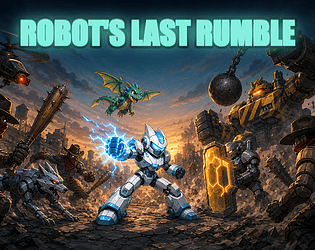
Check the official page for current availability, supported devices and any in-game purchases. Browser controls may require a keyboard or mouse.
ANSWERS FOR YOUR FIRST SESSION
Robot's Last Rumble gameplay guide and player questions
itch.io browser edition · Researched Nov 13, 2026 · Guide updated Nov 13, 2026.
Our guidance
How do I perform a heavy attack to break enemy shields?
To execute a heavy attack, hold the left or right side of the screen depending on which side the enemies are approaching. This powerful move hits the entire side and is specifically designed to break through enemy shields.
What is the best way to avoid attacks that cannot be blocked?
When you encounter attacks that you cannot block, use the jetpack-jump mechanic. On a keyboard, press W, Up, or Space. If you are using a touch interface, simply tap the top of the screen to leap over incoming threats.
To successfully parry, you must guard at the precise moment before an enemy hit lands. Use the S, Down, or K keys on your keyboard, or hold the bottom of the screen if you are playing on a touch device.
The Wrecker boss appears every fifth wave. This challenging encounter features three distinct phases that you must overcome to progress further through the regions. Be prepared for a tougher fight than standard waves when this boss arrives.
How can I improve my robot's abilities between waves?
Between waves, you will participate in an upgrade draft where you choose one of three cards. Selecting specific pairs of cards can unlock powerful synergies, and you can use the R key to reroll your options if you have rerolls available.
What should I do with the cores I earn during my runs?
Cores earned during your gameplay sessions are used to purchase permanent upgrades for your robot. These upgrades help you improve your performance across the five different regions and four difficulty levels available in the game.
How do I activate the screen-wide Overdrive special move?
To trigger the Overdrive special move, you must first fill your special meter through combat. Once full, activate it by pressing E, Shift, J, or X on your keyboard, or by tapping the designated SPECIAL button on your touch screen.
Your progress is saved automatically within your browser. You do not need to create an account to play, and the game does not send any personal data anywhere, ensuring your session data remains local to your browser environment.
What are the different robot chassis options available?
The game features three distinct robot chassis that you can unlock and utilize. These chassis provide variety to your playstyle as you fight through the City, Jungle, Desert, Moon, and Mars regions on your chosen difficulty level.
Are there specific tools to help hold a side of the screen?
Yes, you can utilize Tesla turrets and barricades to help hold a side of the screen against incoming enemies. These tactical additions are part of the available upgrades that can be drafted between waves to strengthen your defense.
AI-assisted research with automated evidence and consistency checks. Good Game Daily organizes publisher information into practical answers. Guidance is an editorial interpretation of those sources. These notes are based on source research rather than a firsthand playtest; editions and later updates may differ.
YOUR NEXT STEP
Set up a browser session
For Robot's Last Rumble · itch.io browser edition.
Controls are not specified in the information panel. Read the developer’s instructions before choosing a device; browser play alone does not establish touch support.
A session length is not verified. Check the save or restart instructions before starting if you have a fixed amount of time.
Use the browser build on the official page. Optional downloads can have different features and prices.