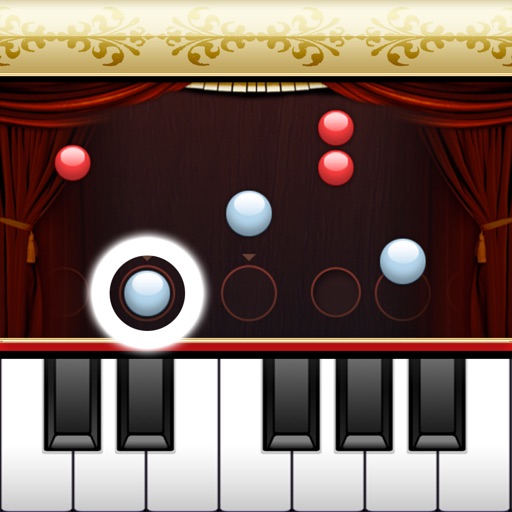
☆★Greatly popular☆★ The online mode BATTLE ARENA! Connecting via a network, you can play against 4 people on a piano battle! Enjoy the PianoMan player and the Piano Battle all around the world! J-Pop Songs are service of only Japan. (Language Setting is Japan) ----- ※ When you first start ※ For initial treatment, must be connected to the network. R
GB
TAKE A LOOK AROUND
Inside the game.
Official screenshots supplied through Apple. Artwork belongs to the respective developer. Download on theApp Store ↗
Check the official page for current availability, supported devices and any in-game purchases.
ANSWERS FOR YOUR FIRST SESSION
Piano Lesson PianoMan gameplay guide and player questions
App Store edition · Researched Nov 9, 2026 · Guide updated Nov 9, 2026.
Source facts
How do I perform songs in Piano Lesson PianoMan?
To perform, simply press the piano keys on your screen according to the timing provided. This mechanic allows you to practice your recital and enjoy the performance even if you do not have prior piano playing experience.
What is a good way to approach learning a new song?
You might consider using the speed regulation feature. By starting at a lower level on the 10-level scale, you can practice playing slowly before gradually increasing the tempo as you become more comfortable with the song's specific rhythm and notes.
What is required before I can begin my first session?
For the initial treatment of the application, you must be connected to a network. It is recommended that you use a Wifi connection to ensure a stable setup process before you start playing your first piano piece.
You can participate in the BATTLE ARENA mode, which allows you to play against four other people simultaneously. This mode requires a network connection to facilitate the competitive piano battle experience with players from around the world.
Are there specific requirements for accessing J-Pop songs?
Yes, J-Pop songs are exclusively available as a service for users in Japan. To access this content, you must ensure that your language settings are configured to Japan within the application.
Can I customize the audio settings during my performance?
Yes, the application provides a feature that allows you to adjust the sound volume of the accompaniment. This helps you balance the audio levels to suit your preference while you practice or perform your piano recital.
Is it possible to expand the library of available music?
Absolutely. While the application comes with a default song list, you have the flexibility to select and download additional songs that you like, allowing you to broaden your repertoire beyond the preset tracks.
What is the primary control method for playing songs?
The game is designed to be played using only one finger. By pressing the piano keys on the screen in accordance with the timing shown, you can create a performance that makes you feel like a real pianist.
Yes, the publisher provides a weekly gift for players. Be sure to check for these updates regularly to see what new items or bonuses might be available to enhance your experience with the application.
What classical pieces are included in the preset song list?
The preset list features a variety of classical works, including J.S. Bach's Air on the G String, Beethoven's For Elise, Pachelbel's Canon in D Major, Chopin's Nocturne No. 2, and Mozart's Turkish March, among several other traditional and famous compositions.
AI-assisted research with automated evidence and consistency checks. Good Game Daily organizes publisher information into practical answers. Guidance is an editorial interpretation of those sources. These notes are based on source research rather than a firsthand playtest; editions and later updates may differ.
Check that your Apple device runs iOS 4.3 or later.
What’s new in 4.1.18.
・Updated the weekly gift.
Release notes supplied by the developer through the App Store.
About Piano Lesson PianoMan
Developer description, as provided in the original store listing.
☆★Greatly popular☆★ The online mode BATTLE ARENA! Connecting via a network, you can play against 4 people on a piano battle! Enjoy the PianoMan player and the Piano Battle all around the world!
J-Pop Songs are service of only Japan. (Language Setting is Japan)
----- ※ When you first start ※ For initial treatment, must be connected to the network. Recommended for connections over Wifi. -----
■About Piano Lesson PianoMan "Piano Lesson PianoMan" is a piano application which can be played just with 1 finger and it makes you feel like a real pianist! Of course, extra songs can be added to the default song list!
■How to play? With Piano Lesson PianoMan, you can enjoy your performance even if you don't play piano. As shown on the screen, just press the piano keys according to the timing and practice your piano recital! Easy, isn't it? (=^▽^)σ
■Strong points of Piano Lesson PianoMan 1. You can select and download the songs you like. 2. Regulation of the speed with 10 level scales: you can play slowly to begin and then increase the speed. 3. Adjustment of the accompaniment's sound volume. 4. You can play against 4 people via a network connection.
***********************
##Preset Songs list
Good to know.
Developer
Yudo Inc.
Release date
Dec 22, 2008
Latest version
4.1.18
Requires
iOS 4.3 or later
Price snapshot
Free GBP
Source checked
Nov 9, 2026
Apple App Store lookup ↗ · Store ratings, prices, and availability can change. Check the App Store for your region.
A few quick answers.
Is Piano Lesson PianoMan available on iPhone?
Piano Lesson PianoMan is listed on the GB App Store. Availability varies by region and compatible device.
Is Piano Lesson PianoMan free?
The recorded download price is free. In-app purchases, subscriptions, or additional content may cost extra. Source checked Nov 9, 2026.
How is the game’s social activity measured?
Good Game Daily compares available samples of recent game mentions with the preceding 24-hour window. Coverage and source failures are disclosed. Read the methodology.