How do I steer my ship effectively?
On desktop, use the A and D keys or the arrow keys to bank around the orbital ring. If you are playing on a mobile device, use the steering pad located at the bottom left of your screen.
Based on source 1.
By NattskiftGames · Web browser
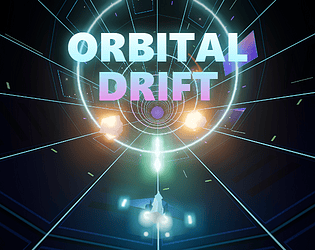
Bank around a glowing orbital tunnel, dodge asteroids and chase energy shards in this fast low-poly arcade runner.
PUBLISHED BY THE DEVELOPER ON ITCH.IOScreenshots published by NattskiftGames on itch.io.
Check the official page for current availability, supported devices and any in-game purchases. Browser controls may require a keyboard or mouse.
itch.io browser edition · Researched Nov 12, 2026 · Guide updated Nov 12, 2026.
On desktop, use the A and D keys or the arrow keys to bank around the orbital ring. If you are playing on a mobile device, use the steering pad located at the bottom left of your screen.
Based on source 1.
You can earn extra boost energy by skimming past rocks on purpose. This maneuver also grants you near-miss bonuses, helping you increase your score while keeping your boost meter filled for when you need it most.
Based on source 1.
Holding the Space bar or the boost button doubles your distance and near-miss points. However, be careful, as the boost drains very quickly. It is best to save your boost for open stretches rather than dense fields.
Based on source 1.
The shard trails are your best guide, as they always follow a safe path through the tunnel. Following these trails helps you navigate through the gaps between asteroids while collecting energy shards along the way.
Based on source 1.
The Drifter is a spiked red rock that sways side to side. You can predict its movement by watching the red arc on the tunnel wall, which shows exactly how far the rock will swing during its cycle.
Based on source 1.
The Debris Belt forms a wall around most of the ring. To pass through it safely, you must look for the specific gap marked by cyan posts and steer your ship directly through that opening.
Based on source 1.
Your score is determined by the distance traveled, energy shards collected, and near misses. Your multiplier increases the longer you survive and the closer you fly to obstacles, though hitting an object will halve your current multiplier.
Based on source 1.
You can sustain up to two hits without ending your run, but a third hit will result in your ship being lost. After a crash, you can quickly restart your session by pressing the R key or Enter.
Based on source 1.
To earn a Perfect Chain bonus, you must successfully collect every single energy shard found in a specific chain. This is a great way to maximize your score while navigating the generated waves of rocks.
Based on source 1.
This game is built with Three.js and requires a modern web browser that supports WebGL. You must also have an active internet connection to play, as all graphics and sounds are generated directly in the code.
Based on source 1.
AI-assisted research with automated evidence and consistency checks. Good Game Daily organizes publisher information into practical answers. Guidance is an editorial interpretation of those sources. These notes are based on source research rather than a firsthand playtest; editions and later updates may differ.
For Orbital Drift · itch.io browser edition.
Decision guide updated 2026-10-29. Based on the publisher listing checked 2026-11-12; this is not a firsthand review.
Browser play and optional downloads may have different prices. Check the developer page for current pricing.
Read the full developer description on itch.io ↗
Checked Nov 12, 2026. Added to Good Game Daily 11/12/2026. A listing date is not necessarily the game’s first release date.
No discussions yet. Share your experience after playing.
Related by shared genres. Platforms and play modes may differ.
 iOS 0 Pulse
From the creator of MinuteQuest comes the hotly anticipated MinuteDungeon ! A classic dungeon-crawler guarante
 iOS 0 Pulse
Play the #1 drifting game on the App Store with over 100 unique cars for fast, furious and fun action. Whether
 iOS 0 Pulse
** Apple Best Games of 2015 ** ** Facebook The 10 Most Talked About Games of 2015 ** ** The Game Awards 2015 N
 iOS 0 Pulse
Enjoy the BLEACH TV Animation Series universe in Bleach: Brave Souls, an all-action game! Over 100 million dow