Check the official page for current availability, supported devices and any in-game purchases. Browser controls may require a keyboard or mouse.
ANSWERS FOR YOUR FIRST SESSION
Lucky Line gameplay guide and player questions
itch.io browser edition · Researched Nov 13, 2026 · Guide updated Nov 13, 2026.
Our guidance
How do I clear lines on the 3x3 board?
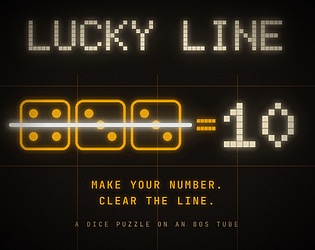
You clear lines by placing dice into empty cells so that any row, column, or diagonal adds up to the current lucky number. One die can contribute to multiple lines simultaneously, helping you clear more space efficiently.
Every three lines cleared, the lucky number shifts. Any existing lines on the board that match this new target number will clear immediately, potentially triggering chain reactions that can clear even more space on your board.
You can hold one die for later use if it does not fit your current strategy. Additionally, you can spend one luck point to reroll your current die or two luck points to nudge a board die's value.
To win a standard run, you must successfully clear seven different lucky numbers. If you fill the board completely with no valid moves remaining, you lose the game. You can also play to chase a high score.
To nudge a die, spend two luck points by clicking the nudge button. Select the specific die you wish to change, then use the minus or plus buttons to adjust its value up or down by one.
Yes, you can hover your mouse over any empty cell on the board. This action displays a preview showing exactly where the die would be placed and calculates the resulting sums for all affected rows, columns, and diagonals.
You can use the number keys on your keyboard to place dice. The keys are laid out like a standard number pad, where 7, 8, and 9 represent the top row of the 3x3 board.
You can choose from four different color skins to customize your experience: Amber Monitor, Outrun Dusk, Replicant, and Acid. These skins complement the 80s tube-display aesthetic, which includes scanlines, vignette, and glow effects.
A board you have carefully arranged to sum to 10 can suddenly become invalid when the lucky number changes to 8. This shift can cause your planned setup to fall apart, potentially leading to a game-ending board fill.
The game does not use pre-recorded audio files. Instead, all sound effects are synthesized by the game engine at start-up. This approach ensures a unique audio experience that fits the browser-based, retro-inspired theme of the project.
AI-assisted research with automated evidence and consistency checks. Good Game Daily organizes publisher information into practical answers. Guidance is an editorial interpretation of those sources. These notes are based on source research rather than a firsthand playtest; editions and later updates may differ.
YOUR NEXT STEP
Set up a browser session
For Lucky Line · itch.io browser edition.
Controls are not specified in the information panel. Read the developer’s instructions before choosing a device; browser play alone does not establish touch support.
A session length is not verified. Check the save or restart instructions before starting if you have a fixed amount of time.
Use the browser build on the official page. Optional downloads can have different features and prices.