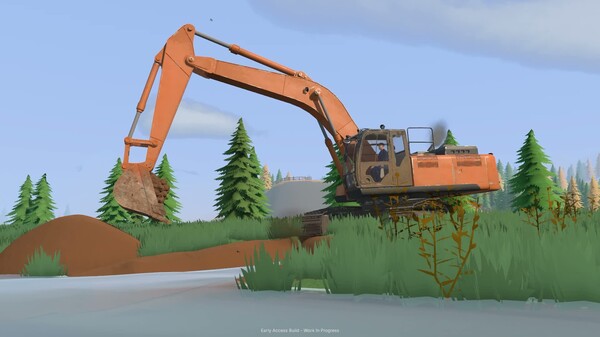
Dig, haul and wash for gold in an open-world heavy machinery simulator. Operate excavators, wheel loaders and bulldozers, reshape the terrain and build your washing setup. Work solo or team up in online co-op to turn untouched ground into a working site.
DESCRIPTION SUPPLIED BY THE DEVELOPER THROUGH STEAM
Check the official page for current availability, supported devices and any in-game purchases.
ANSWERS FOR YOUR FIRST SESSION
Groundwork Simulator gameplay guide and player questions
Steam edition · Researched Nov 9, 2026 · Guide updated Nov 9, 2026.
Our guidance
How can I manage the difficulty of my excavation tasks?
You can adjust the difficulty settings to suit your preference. The game also features a mode playable without timed input, allowing you to work at your own pace while managing heavy machinery and site operations effectively.
What is the primary goal when digging into the hillside?
The primary goal is to reshape the landscape to uncover gold. You must dig trenches and cut into hillsides, then process the excavated material through your wash plant to recover gold from the dirt.
How does the excavation engine simulate real-world digging?
The engine provides simulated hydraulic feedback that creates resistance when your bucket meets the ground. You must adjust your angle and utilize available hydraulic power to successfully cut through terrain and lift heavy loads of material.
What steps should I take to start a gold recovery operation?
First, drill and test the land to locate gold-rich ground. Once you choose a digging spot, set up your wash plant, excavate the material, run it through sluice boxes, and process the final concentrate on the shaking table.
How do I ensure my wash plant remains operational?
You must bring water to your washing operation using pumps and hoses. Carefully position your equipment and route connections across the site to ensure water flows where needed, adapting your setup as the worksite grows.
How can I move my heavy machinery between different worksites?
You must load your heavy machinery onto a trailer and haul it using a truck. Plan your route carefully to navigate tight turns, slopes, and rough terrain before unloading your equipment at the new site.
What should I consider when driving over rough terrain?
Always watch your traction and choose your approach carefully, especially when carrying a heavy load. If the ground is too difficult, you may need to improve the terrain beneath your wheels before you can continue working.
Yes, you can divide the work in online co-op. You might coordinate by having one player operate the excavator while another handles transport, ensuring material keeps moving efficiently between the digging area and the wash plant.
How does changing the landscape affect future work?
Every scoop changes the ground, creating new routes and steeper slopes. The ground you leave behind becomes the foundation for your next job, so you must plan your approach to ensure the site remains functional for future tasks.
Are there specific controller options available for this game?
The game offers full controller support, including specific compatibility for DualShock and DualSense controllers. This allows you to choose your preferred input method while managing the realistic physics of your heavy machinery.
AI-assisted research with automated evidence and consistency checks. Good Game Daily organizes publisher information into practical answers. Guidance is an editorial interpretation of those sources. These notes are based on source research rather than a firsthand playtest; editions and later updates may differ.
YOUR NEXT STEP
Plan how your group will connect
For Groundwork Simulator · Steam edition.
This Steam edition lists Co-op, Online Co-op. Choose the mode that matches your group’s computers, network or shared display.
Before inviting friends, confirm the player limit, copy or account requirements and exact compatible editions. A listing on another platform does not establish cross-play.
Full controller support is listed. The full-game US price snapshot is 24.99 USD; check the current price in your region.
Minimum: Requires a 64-bit processor and operating system OS: Windows 10 Processor: Intel Core i5-8400 / AMD Ryzen 5 2600 Memory: 16 GB RAM Graphics: NVIDIA GTX 1070 — 8 GB VRAM DirectX: Version 12 Storage: 10 GB available space Additional Notes: Groundwork Simulator’s detailed soil and water physics place a heavy load on the CPU. These complex simulations make the game demanding, even if its visuals may suggest otherwise.
macOS minimum requirements
Minimum: Requires an Apple processor OS: Tahoe or greater Processor: Apple M4 Memory: 16 GB RAM Graphics: Apple M4
Linux minimum requirements
Minimum:
From the community.
No discussions yet. Share your experience after playing.
KEEP EXPLORING
More in your kind of genre.
Related by shared genres. Platforms and play modes may differ.