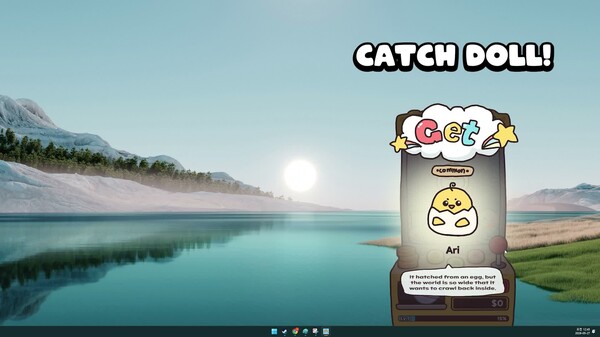
Graboo is the shyest claw machine in the world. Graboo quietly picks up doll friends from the corner of the screen while you're working or enjoying games. Give warm friends to Graboo, a loner!
DESCRIPTION SUPPLIED BY THE DEVELOPER THROUGH STEAM
Inside the game.
Screenshots supplied by JJelly Studio through Steam.
Check the official page for current availability, supported devices and any in-game purchases.
ANSWERS FOR YOUR FIRST SESSION
Desktop Claw Master gameplay guide and player questions
Steam edition · Researched Nov 13, 2026 · Guide updated Nov 13, 2026.
Source facts
Can I play this game while focusing on other tasks?
Yes, the game is designed to run on your desktop while you work, watch videos, or play other games. It features a specific Idle mode that allows the claw machine to operate while you remain productive elsewhere.
Does the game require fast reflexes or timed inputs?
No, the game is fully playable at your own pace. It does not require timed inputs, making it a relaxing experience that you can enjoy without the pressure of quick reaction times or strict mechanical deadlines.
While the game features an Idle mode, you can actively participate to make friends faster. By clicking directly on the machine, you can manually trigger the tongs to pick up dolls rather than waiting for the automated process.
The goal is to fill in your drawing board by collecting numerous dolls, each with different charms. This collection process allows you to decorate your space and provides companionship for Graboo, the timid claw machine tongs.
You can use the points earned from picking dolls to customize Graboo. This allows you to change her look, such as adding hats, to make the timid claw machine tongs appear more glamorous and cute on your desktop.
Is it possible to choose which dolls the machine picks up?
Yes, in the game's full Idle mode, you have the ability to pick your own doll. This gives you control over your collection and helps you fill your drawing board with the specific friends you want to gather.
Yes, the game includes a Mouse Only Option. This makes it accessible and easy to manage while you are multitasking on your computer, as you do not need to rely on keyboard shortcuts to operate the claw machine.
Graboo is the timid claw machine tongs that lives on your desktop. She is a loner who wants to make friends, and your role is to help her pluck up the courage to collect dolls and find companionship.
You simply need to set up a small space for Graboo in the corner of your desktop. Once positioned, she will remain there to assist you with collecting dolls while you go about your daily computer activities.
Does the game support Steam features like achievements?
Yes, the game includes Steam Achievements for players to earn. Additionally, it supports other standard platform features such as Family Sharing and custom volume controls to ensure the experience fits your personal preferences and setup.
AI-assisted research with automated evidence and consistency checks. Good Game Daily organizes publisher information into practical answers. Guidance is an editorial interpretation of those sources. These notes are based on source research rather than a firsthand playtest; editions and later updates may differ.
YOUR NEXT STEP
Try a sample before deciding on the full game
For Desktop Claw Master · Steam edition.
Open the separate demo listing and check its own requirements. The full game lists Windows; the demo can differ.
Use the demo to check whether the controls, readability and pace suit you. Save transfer to the full game is not verified here.
The full game is marked coming soon. A full-game price is not verified here; check the store before deciding.
Minimum: Requires a 64-bit processor and operating system OS: Windows 10 or 11 (64-bit) Processor: Intel Core i3 or equivalent Memory: 2 GB RAM Graphics: Integrated Graphics or DirectX 10 compatible card DirectX: Version 10 Storage: 500 MB available space
Linux minimum requirements
Minimum:
macOS minimum requirements
Minimum:
From the community.
No discussions yet. Share your experience after playing.
KEEP EXPLORING
More in your kind of genre.
Related by shared genres. Platforms and play modes may differ.